
Last updated on
Nov 6, 2026

CZ Blank SSN Card free printable template
We are not affiliated with any brand or entity on this form

Fill out
Complete the form online in a simple drag-and-drop editor.

eSign
Add your legally binding signature or send the form for signing.

Share
Share the form via a link, letting anyone fill it out from any device.

Export
Download, print, email, or move the form to your cloud storage.
Why pdfFiller is the best tool for your documents and forms


End-to-end document management
From editing and signing to collaboration and tracking, pdfFiller has everything you need to get your documents done quickly and efficiently.
Accessible from anywhere
pdfFiller is fully cloud-based. This means you can edit, sign, and share documents from anywhere using your computer, smartphone, or tablet.
Secure and compliant
pdfFiller lets you securely manage documents following global laws like ESIGN, CCPA, and GDPR. It's also HIPAA and SOC 2 compliant.
What is CZ Blank SSN Card
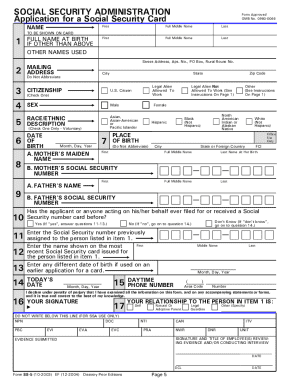
The Blank SSN Card Generator is a personal form used by individuals to create a template for a Social Security Number (SSN) card for personal use.
pdfFiller scores top ratings on review platforms




PROCESS SERVER FORM WAS EASY TO ACCESS AND FILL OUT
Very convenient to use and especially to find standard forms.
Who needs CZ Blank SSN Card?
Explore how professionals across industries use pdfFiller.

CZ Blank SSN Card is needed by:
-
Individuals applying for a Social Security Number card
-
Parents creating SSN cards for their children
-
Students needing to provide SSN information
-
Professionals requiring documentation for employment
-
Residents completing personal legal forms
-
Anyone needing a personal data sheet
Comprehensive Guide to CZ Blank SSN Card
What is the Blank SSN Card Generator?
The Blank SSN Card Generator is designed to assist users in creating a personalized Social Security Number card template. This generator includes essential fields such as name, rank, date of rank, and SSN, which can be filled out with personal information. It is important to emphasize that this tool is intended solely for personal use.
Purpose and Benefits of Using the Blank SSN Card Generator
Utilizing the Blank SSN Card Generator simplifies the creation of a personalized SSN card. This form provides several advantages, including:
-
Saving time when crafting a detailed personal data sheet.
-
Ensuring accuracy in presenting personal data.
-
Offering an easy-to-fill format and the ability to print using pdfFiller.
Key Features of the Blank SSN Card Generator
This generator stands out due to its user-friendly features, which include the ability to edit, fill, and save the form as a PDF. Security measures are in place, such as 256-bit encryption, to protect personal information. Users also have the added convenience of easily sharing their filled forms through pdfFiller.
Field-by-Field Instructions for Filling Out the Blank SSN Card Generator
When filling out the Blank SSN Card Generator, it is crucial to follow detailed guidance for each field. Here are the step-by-step instructions:
-
Enter your name in the designated field.
-
Provide your Social Security Number (SSN) accurately.
-
Fill in your rank and date of rank where specified.
Be cautious of common mistakes, such as misspelling or entering your SSN incorrectly, to avoid issues down the line.
How to Download and Print the Blank SSN Card Generator
To access and print the Blank SSN Card Generator form, follow these guidelines:
-
Download the template from pdfFiller.
-
Ensure you have the completed form ready for printing.
-
Save a digital copy of the form for future use.
Who Needs the Blank SSN Card Generator?
The Blank SSN Card Generator is beneficial for individuals who require a structured template to manage their SSN card details. It is particularly useful in situations such as organizing personal documents or ensuring that SSN information is reliably maintained.
Security Measures and Compliance when Using the Blank SSN Card Generator
Data protection and privacy are paramount when utilizing the Blank SSN Card Generator. The security protocols incorporate compliance with HIPAA and GDPR regulations, ensuring that personal information is safeguarded. pdfFiller further enhances security by implementing robust measures to protect user data.
What to Do After Completing the Blank SSN Card Generator
Once you have filled out the Blank SSN Card Generator, consider the following next steps for managing your completed SSN card template:
-
Store or file the completed document securely.
-
Keep a digital copy up to date for easy access.
-
Use the completed document for personal records or application purposes.
Utilizing pdfFiller for a Hassle-Free Experience with Your Blank SSN Card Generator
Leveraging pdfFiller for managing your Blank SSN Card Generator needs is a wise choice. The platform allows for seamless form management, editing, and saving of documents. With capabilities to create fillable forms and eSign when required, pdfFiller offers a trustworthy solution for handling sensitive documents.
How to fill out the CZ Blank SSN Card
-
1.Access the Blank SSN Card Generator on pdfFiller by searching for the form name in the search bar and selecting it from the results.
-
2.Once the form is open, navigate through the document to locate the fields labeled for personal data such as name, rank, date of rank, and SSN.
-
3.Gather necessary information before starting the form, including your personal details, especially your Social Security Number and any relevant personal identifiers.
-
4.Using pdfFiller’s interface, click on each field to enter the required information. Make sure to fill out all sections accurately to avoid any issues later.
-
5.After entering all personal data, take a moment to review the entire form. Check for any errors or missing information to ensure accuracy.
-
6.Finalize the form by clicking on the 'Save' option in pdfFiller. You may choose to download the form as a PDF or save it in your pdfFiller account for future use.
-
7.Once saved, you can either print the form directly or download it to your device. If you need to submit it elsewhere, follow the instructions provided by the relevant authority.

Who is eligible to use the Blank SSN Card Generator?
Any individual needing a template for a Social Security Number card can use the Blank SSN Card Generator, including parents for children and students.
Are there any deadlines for using this form?
There are no specific deadlines for creating a template with the Blank SSN Card Generator, as it is meant for personal use. However, ensure timely application for any official needs.
What do I need to submit with this form?
For the Blank SSN Card Generator, you do not require any additional documents to create the form itself, but ensure you have accurate personal details to fill in.
Can I save my progress on pdfFiller?
Yes, pdfFiller allows you to save your progress while filling out the Blank SSN Card Generator. You can return to edit your form at any time.
What common mistakes should I avoid when filling out this form?
Common mistakes include entering incorrect SSN, missing required fields, and not reviewing the form before saving. Always double-check your entries.
How quickly can I process this form once completed?
Once you complete the form on pdfFiller, you can immediately save, download, or print it. Processing time varies if submitted to a third party.
Is notarization required for the Blank SSN Card Generator?
No, notarization is not required for the Blank SSN Card Generator as it is a personal document intended for individual use.
Related Forms





Related Catalogs
Get the latest insights from our blog


If you believe that this page should be taken down, please follow our DMCA take down process
here
.
This form may include fields for payment information. Data entered in these fields is not covered by PCI DSS compliance.